

Using the console
Reports
The state of your fleet over time, for you and for whoever you answer to.
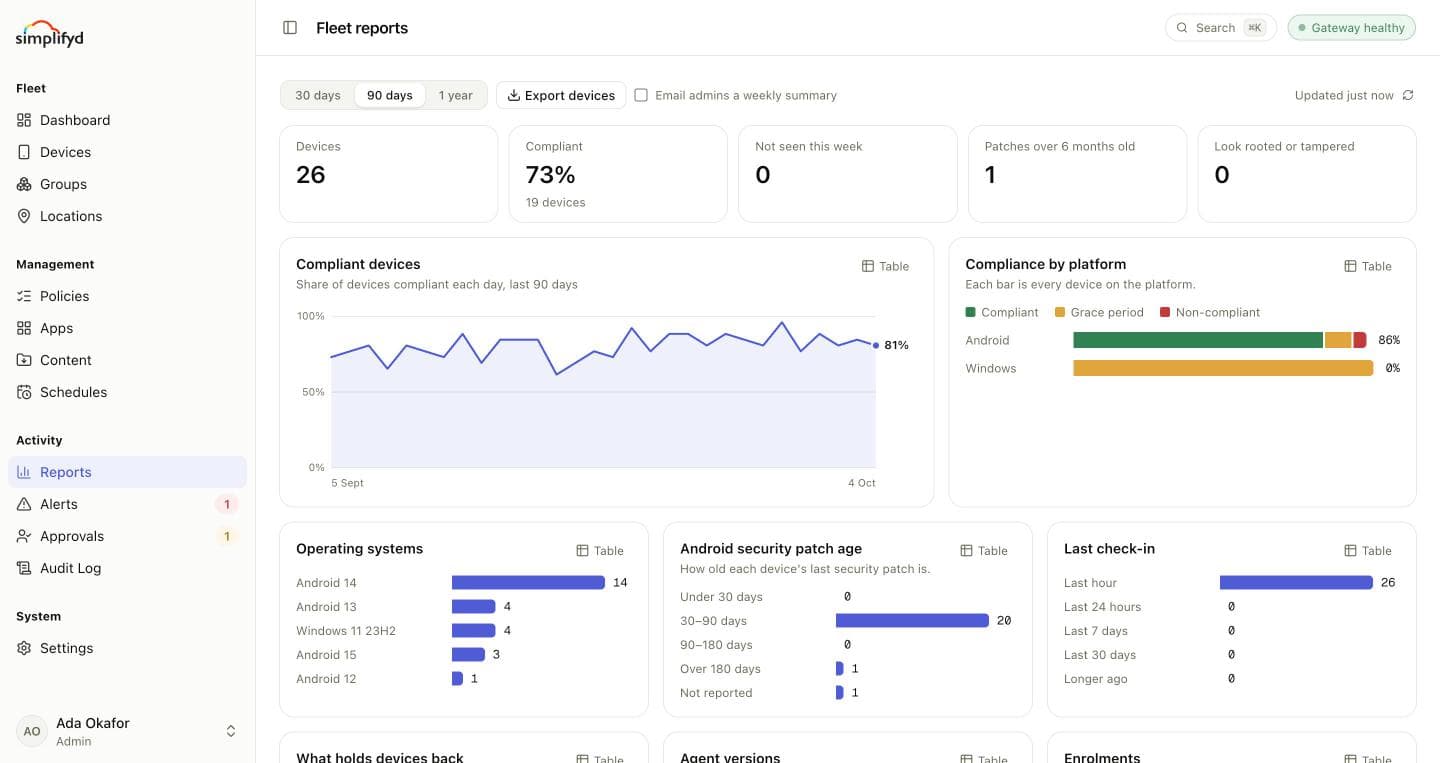
Reports shows how your fleet is doing and how that has changed. Choose the period at the top: 30 days, 90 days or 1 year.
The headline numbers
Devices, the share Compliant, devices Not seen this week, Android devices whose Patches are over 6 months old, and devices that Look rooted or tampered.
The charts
| Chart | What it shows |
|---|---|
| Compliant devices | The share of devices compliant each day over the period. |
| Compliance by platform | Android and Windows, each split into compliant, grace period and non-compliant. |
| Operating systems | How many devices run each Android version and Windows release. |
| Android security patch age | How old each device's last security patch is. |
| Last check-in | How recently devices last checked in. |
| What holds devices back | How many devices have each finding. A device can have several. |
| Agent versions | Which agent version agent devices run. |
| Enrolments | Devices enrolled each week over the last 12 weeks. |
Each chart has a Table button that shows the same figures as numbers, for copying into a report.
Exporting and emailing
- Export devices downloads every device with its details as a spreadsheet.
- Email admins a weekly summary sends your organisation's admins a short email once a week with the headline numbers and how compliance moved. Untick it to stop.
The Devices list exports too, as CSV, Excel or PDF.